> ## Documentation Index
> Fetch the complete documentation index at: https://docs.popsink.com/llms.txt
> Use this file to discover all available pages before exploring further.
# Deployment options
> SaaS, BYOC, on-premises and air-gapped compared, and the two form factors the data plane ships in.
Popsink supports multiple deployment models so that you can run the same core engine, with the same features and performance, in the mode that fits your organization’s requirements. The primary deployment models are:
1. **SaaS (fully managed)**
2. **Bring Your Own Cloud (BYOC)**
3. **On-Premises (on-prem)**
4. **Air-Gapped / Isolated**
***
## Overview
Popsink’s deployment architecture is designed to adapt to different security postures, regulatory constraints, and operational preferences. Regardless of the model chosen, you benefit from the same core capabilities (e.g. data ingestion, replication, pipeline processing, observability). The choice of deployment impacts responsibilities for infrastructure, upgrades, connectivity, and control.
High level comparison:
| Deployment Mode | Infrastructure Ownership | Connectivity Requirements | Upgrade / Patching Responsibility | Typical Use Cases |
| --------------------- | --------------------------------------------- | ------------------------------------------------------ | --------------------------------- | --------------------------------------------------- |
| SaaS | Popsink-managed cloud | Outbound connectivity required | Popsink handles | Fast startup, low ops, non-restrictive environments |
| BYOC | Customer’s cloud account | Outbound/inbound as required | Shared (Popsink + Customer) | Organizations wanting control over data, keys, cost |
| On-Premises | Customer-managed data center or private cloud | Standard internal networking, limited external contact | Customer (with Popsink guidance) | Enterprises with strict internal hosting needs |
| Air-Gapped / Isolated | Customer-managed, isolated network | No outbound connectivity allowed | Offline, signed update bundles | Regulated environments, high-security zones |
***
## How it actually gets installed
The four models above describe *who owns the infrastructure*. BYOC, on-premises
and air-gapped all run the same software — a **Popsink data plane** — and it
comes in two form factors:
The production shape. Horizontal scaling, high availability, upgrades with
`helm upgrade`. Needs two nodes and an ingress controller.
One pre-built VM image, no Kubernetes knowledge required. Evaluation and
lightweight workloads; no horizontal scaling, no built-in TLS.
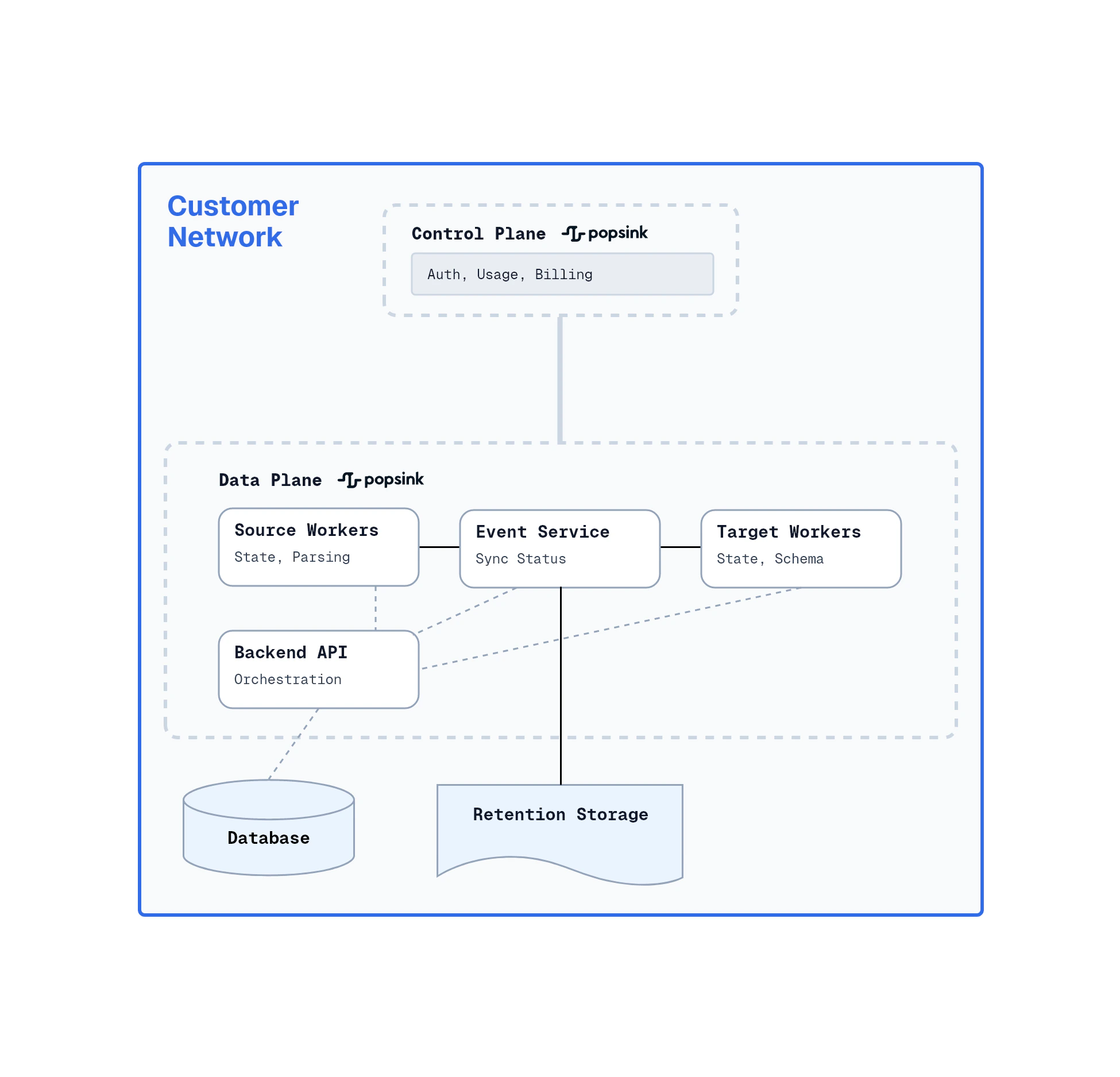
Either way the data plane attaches to a **control plane** — ours, or your own —
which manages your fleet, users and entitlements. What crosses between the two
is documented in
[Control plane and data plane](/deployment/architecture/control-data-plane); air-gapped
installs run with no control plane at all.
What the cluster, the network and your Popsink account must provide first.
How to map deployments onto your regions, networks and staging tiers.
Reaching a source that is not on the data plane's network.
How large a single deployment gets before the design has to be split.
***
## Deployment Models — Detailed Descriptions
Below are more detailed descriptions of each deployment model, including features, constraints, and prerequisites.
### 1. SaaS (Fully Managed)
**Description**
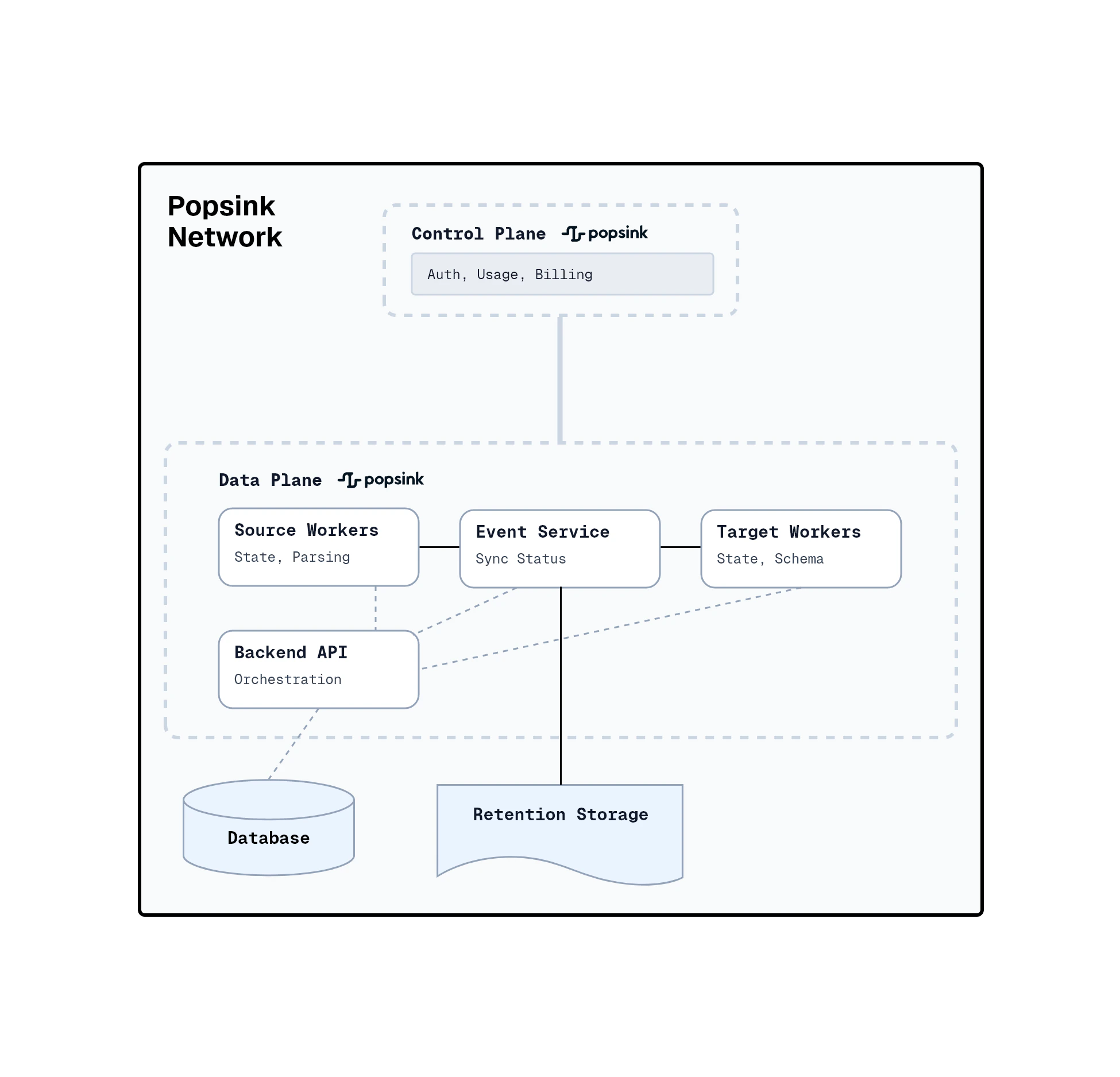
In this model, Popsink hosts and manages the full stack (compute, storage, networking, orchestration) in a cloud environment. The user interacts via APIs, consoles, or UI but does not need to provision or manage infrastructure.
**Key Features & Benefits**
* Zero ops: Setup can be done in hours
* Automatic upgrades and patches
* Elastic scaling under predictable SLAs
* Data boundary controls: region selection, private networking options
**Responsibilities**
* Popsink: manage infrastructure, scaling, updates, high availability
* Customer: data modeling, configuration, access controls, inbound/outbound integration
 ### 2. Bring Your Own Cloud (BYOC)
**Description**
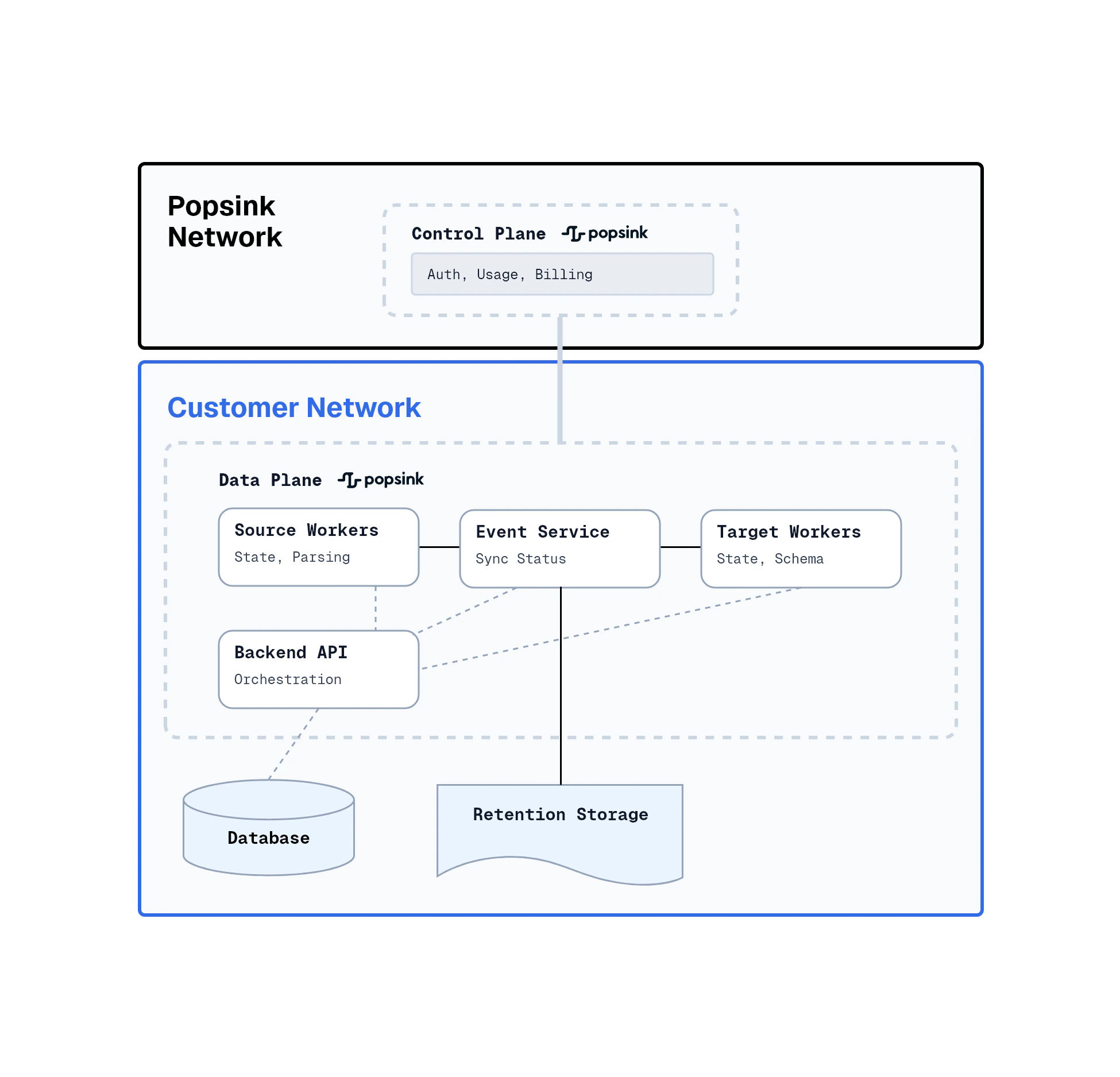
This model installs Popsink within the customer’s own cloud account (e.g. AWS, GCP, Azure). All data, keys, and spend remain under the customer's control. The deployed components run within the customer’s VPC and use existing identity and key management systems.
**Key Features & Benefits**
* Data stays inside your VPC
* VPC-only traffic (internal networking)
* Single-tenant cost visibility
* More control over infrastructure and governance
**Responsibilities**
* Customer: provide the target cloud account, networking setup, VPC connectivity
* Popsink: deliver the deployment artifacts, containers, orchestration, guidance for upgrades, monitoring
### 2. Bring Your Own Cloud (BYOC)
**Description**
This model installs Popsink within the customer’s own cloud account (e.g. AWS, GCP, Azure). All data, keys, and spend remain under the customer's control. The deployed components run within the customer’s VPC and use existing identity and key management systems.
**Key Features & Benefits**
* Data stays inside your VPC
* VPC-only traffic (internal networking)
* Single-tenant cost visibility
* More control over infrastructure and governance
**Responsibilities**
* Customer: provide the target cloud account, networking setup, VPC connectivity
* Popsink: deliver the deployment artifacts, containers, orchestration, guidance for upgrades, monitoring
 ### 3. On-Premises (On-Prem)
**Description**
Popsink can run within a customer’s data center or private cloud environment, in a Kubernetes cluster.
**Key Features & Benefits**
* Supports Kubernetes or VM installations
* Integrates with enterprise SSO
* Minimal external dependencies
**Responsibilities**
* Customer: provide the physical/virtual infrastructure, storage, networking, identity, monitoring
* Popsink: provide the software, configuration, deployment instructions, integration with identity and observability systems
### 4. Air-Gapped / Isolated
**Description**
In environments that prohibit outbound connectivity (e.g. high-security, classified, regulatory environments), Popsink supports an air-gapped deployment. All operations, updates, and communications happen without external network connectivity. Updates are delivered via signed offline bundles, and the environment supports strict change control and auditing.
**Key Features & Benefits**
* No outbound connectivity required
* Offline, signed update bundles (auditable)
* Controlled, auditable deployments
* End-to-end policy enforcement
**Responsibilities**
* Customer: maintain the isolated network, provide mechanisms for secure update transfer, ensure auditability
* Popsink: provide offline deployment artifacts, signature verification, rollback and upgrade procedures
### 3. On-Premises (On-Prem)
**Description**
Popsink can run within a customer’s data center or private cloud environment, in a Kubernetes cluster.
**Key Features & Benefits**
* Supports Kubernetes or VM installations
* Integrates with enterprise SSO
* Minimal external dependencies
**Responsibilities**
* Customer: provide the physical/virtual infrastructure, storage, networking, identity, monitoring
* Popsink: provide the software, configuration, deployment instructions, integration with identity and observability systems
### 4. Air-Gapped / Isolated
**Description**
In environments that prohibit outbound connectivity (e.g. high-security, classified, regulatory environments), Popsink supports an air-gapped deployment. All operations, updates, and communications happen without external network connectivity. Updates are delivered via signed offline bundles, and the environment supports strict change control and auditing.
**Key Features & Benefits**
* No outbound connectivity required
* Offline, signed update bundles (auditable)
* Controlled, auditable deployments
* End-to-end policy enforcement
**Responsibilities**
* Customer: maintain the isolated network, provide mechanisms for secure update transfer, ensure auditability
* Popsink: provide offline deployment artifacts, signature verification, rollback and upgrade procedures